Live Scores Updating Before Sports Video Streams
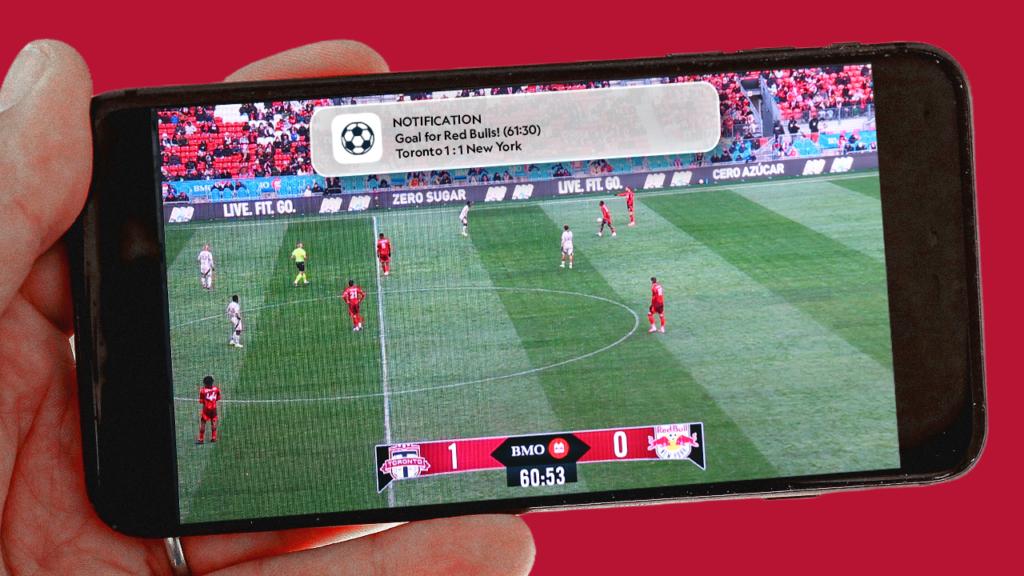
Imagine watching a football final when your phone suddenly displays “GOAL 1–0.” The video on your television still shows the attacking move developing, and the goal does not appear until several seconds later.
This is common when a score application receives event data closer to real time than the video player receives and displays the corresponding footage. A score update is a small structured data message, while live video must pass through capture, production, encoding, distribution, buffering, and decoding systems.
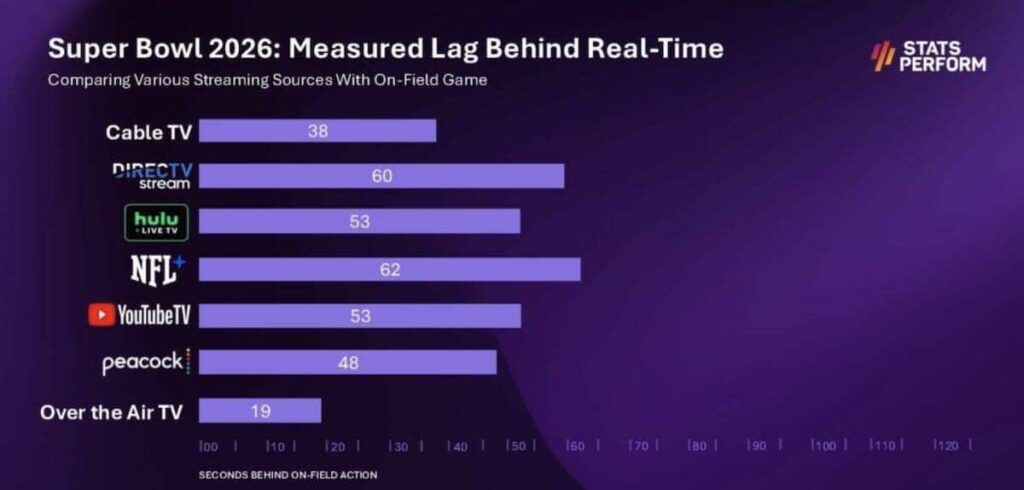
The size difference matters, but it is only part of the explanation. The final delay also depends on the broadcaster, streaming protocol, advertising system, device, network, and player settings. A conventional television feed can sometimes be ahead of an internet stream, but a low-latency OTT service may be close to or occasionally ahead of another television delivery method.
Core Reasons Why Live Score Apps Update Faster Than Sports Video Streams
The gap usually comes from two differences: the amount of information being delivered and the number of processing stages it must pass through.
Small Data Payload: A sports-data update may contain an event type, team, player, match clock, score, and event identifier. It is much smaller than a continuous high-definition video stream containing many frames per second, audio, captions, and metadata.
The score message still includes networking and application overhead, so it is inaccurate to describe the entire transmission as only a few bytes. The important point is that it can be collected, validated, distributed, and displayed without waiting for video frames to be compressed and buffered.
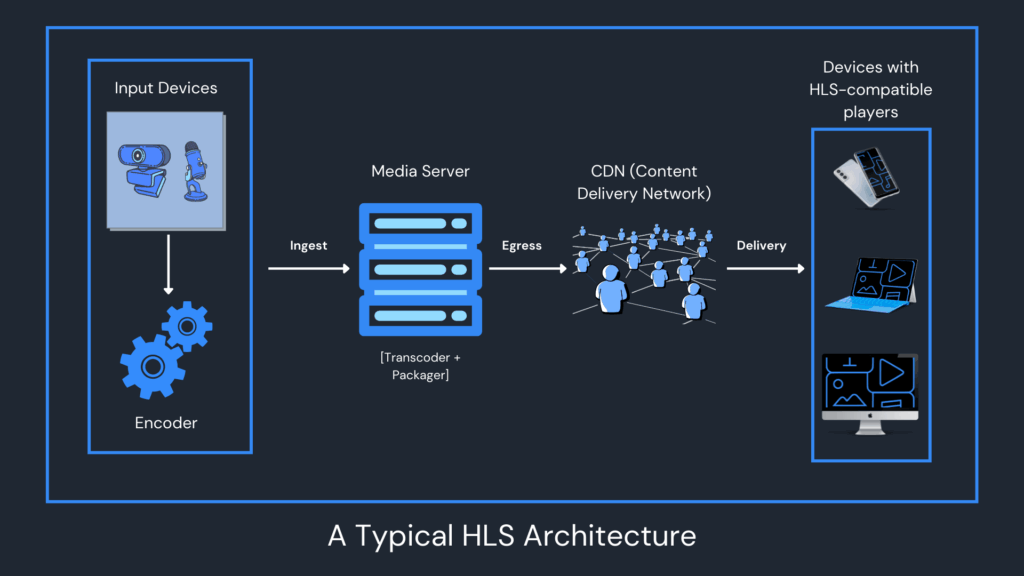
Complex Video Encoding and Delivery Pipeline: Stadium footage normally passes from cameras into a production system where operators select angles, add graphics, mix audio, and prepare the broadcast feed. The signal may then be encoded into several quality levels, packaged for delivery, protected with digital rights management, distributed through a content delivery network, buffered by the player, and decoded by the viewing device.
Every stage can add a small delay. Together, they can place the video noticeably behind the action occurring at the venue.
Comparison Table of Latency Across Sports Viewing Methods and Score Apps
Latency varies widely, so the values below should be treated as common patterns rather than guaranteed averages.
| Viewing Method | Typical Latency Pattern | Core Cause of Latency |
|---|---|---|
| In-Stadium Live | Closest to the actual event | The spectator sees the action directly, although venue screens and scoreboards may have their own delay |
| Live Score Apps | Often updates within seconds, but may be slower or corrected later | Event collection, validation, provider feeds, app servers, and mobile notification delivery |
| Terrestrial, Cable, or Satellite TV | Often several seconds behind the venue, with variation between providers | Production, encoding, transmission, receiver processing, and any intentional broadcast delay |
| Standard OTT Streaming | Commonly around 12–30 seconds in conventional HLS workflows | Encoding, complete media segments, playlist updates, CDN delivery, and player buffering |
| Low-Latency OTT Streaming | Can reduce delay to a few seconds under suitable conditions | Partial media segments, faster playlist updates, smaller buffers, and optimized players |
| Unofficial or Restreamed Video | Unpredictable and often significantly delayed | Capture of another feed, re-encoding, additional buffering, overloaded servers, and unstable delivery |
AWS describes standard HLS latency as commonly ranging from approximately 12 to 30 seconds, depending on workflow and player capabilities. Its documentation states that Low-Latency HLS can reduce this to roughly 3–10 seconds in suitable implementations. These figures are examples rather than universal limits.
A score app also does not always win the race. Notifications can be delayed by mobile operating-system controls, network congestion, provider verification, or the app’s own infrastructure. Goals may also be corrected or canceled after an official review.
The Technology Behind Live Score Apps: How Do They Update Goals in Milliseconds?
Sports-data companies use several collection methods. Depending on the competition, data may come from in-venue personnel, official league feeds, broadcast monitoring, tracking systems, computer vision, or analysts working from centralized operations rooms.
Sportradar states that its soccer data is collected through on-venue scouts and in-house operators. Stats Perform says Opta combines trained collection experts, in-stadium analysts, computer vision, automation, and validation systems.
In-Stadium Data Collection: An operator records key events such as goals, cards, substitutions, or penalties through a dedicated data-entry system. The event may then pass through automated or human validation before being sent to customers.
Not every score provider places a scout in every stadium, and not every event is distributed immediately. Collection arrangements depend on the sport, competition, licensing agreement, and coverage level.
Continuous Data Feeds: Providers may offer polling APIs and persistent push feeds. Sportradar’s soccer push service allows clients to keep a connection open and receive continuous event updates as data changes, avoiding the need to request the API repeatedly.
The score application then processes the provider’s update and sends its own notification. This may happen quickly, but “in milliseconds” is not a dependable promise for the complete path from stadium event to a user’s phone.
A provider may delay or revise an update when the scorer is uncertain, a goal is under video review, the match clock is corrected, or the initial event attribution changes.
Why Does Live Video (Livestream / TV) Lag by Seconds or Minutes?
Live video has to remain watchable while serving viewers with different internet speeds, devices, and screen resolutions. Streaming systems therefore balance low delay against stable playback.
Video Chunking Protocols (HLS / DASH)
HLS and MPEG-DASH commonly divide live media into segments that are delivered through ordinary internet infrastructure. Apple’s HLS authoring specification recommends nominal segment durations of around six seconds for conventional streams, although actual configurations vary.
A player following a traditional workflow may wait until a segment has been encoded and published before downloading it. Several segments may also be kept between the live event and playback.
Low-Latency HLS reduces this delay by making partial segments available before the complete segment is finished. Low-Latency DASH uses related techniques to make media available closer to the live edge. Apple states that properly implemented Low-Latency HLS can achieve delays of around two seconds or less in suitable environments, but actual consumer results still depend on the full delivery chain.
Device Safety Buffering
A video player normally stores some media ahead of the frame currently being shown. This reserve allows playback to continue during short network slowdowns.
Reducing the buffer can bring the viewer closer to live action, but it also leaves less protection against unstable Wi-Fi, mobile-network variation, and temporary CDN or device slowdowns. DASH-IF documentation notes that lowering the target latency can reduce the player’s ability to maintain a stable buffer.
The delay can grow if the viewer pauses, rewinds, resumes after a connection interruption, or allows the player to rebuild a larger buffer. Two devices using the same service may therefore show the match at different times.
Content Delivery Network (CDN) Propagation
A CDN does not normally pass a stream through hundreds of edge servers in sequence. It routes users to nearby infrastructure so content can be delivered efficiently at scale.
CDNs generally reduce the distance between the viewer and the media source. However, the complete distribution workflow still includes ingest, encoding, packaging, origin servers, caches, playlist updates, advertisements, digital rights checks, and player requests.
Latency can also increase when a platform inserts personalized advertising, changes video quality, uses a casting device, or distributes a feed through several commercial partners before it reaches the viewer.
The Impact of “Spoiler Alerts” on Emotional Experience and Viewing Habits
Receiving the result before seeing the play changes the viewing experience.
Loss of Suspense: Instead of reacting naturally to an attack, the viewer knows that a decisive event is about to happen.
Divided Attention: Notifications encourage viewers to look between the television and phone, making it easier to miss the buildup to an important moment.
Confusing Shared Viewing: People watching the same match through different services may celebrate at different times. A neighbor using cable, a friend watching a low-latency stream, and a viewer using a standard OTT app may all see the same goal several seconds apart.
Avoiding spoilers therefore requires controlling notifications as well as selecting a suitable video service.
Practical Tips to Avoid Spoilers When Watching Thrilling Matches
Disable Sports App Push Notifications Before Kickoff: Turn off match alerts for score, news, betting, fantasy-sports, and social-media apps. Muting only one score application may not be enough if another service sends the same result.
Enable “Spoiler-Free Mode” or “Hide Scores”: Use this setting when the streaming service or sports application provides it. Confirm that scores are hidden on the homepage, match menu, replay screen, and connected television interface.
Enable Do Not Disturb and Put the Phone Away: Do Not Disturb can silence sounds and vibrations, but some systems may still display notifications unless visual interruptions are also restricted. Android documentation notes that notifications can remain visible in the system interface under some Do Not Disturb settings.
Avoid Social Media and Group Chats: A message preview, trending topic, search suggestion, or friend’s reaction can reveal the result even when score alerts are disabled.
Stay at the Live Edge: Avoid pausing or rewinding. When the player offers “Go Live,” “Jump to Live,” or a similar button, use it to remove delay accumulated during playback.
Review the Actual Platform Delay: Traditional television is not always the fastest option, and not every OTT service uses the same workflow. Compare the services available for the event and look for an official low-latency or reduced-delay mode.
Use a Stable Connection: Ethernet or strong Wi-Fi can help a player remain near its intended live position. An unstable connection may force it to increase the buffer or fall farther behind.
Live scores can appear before sports video because structured event data follows a much shorter processing path. Video must be produced, encoded, packaged, distributed, buffered, and decoded before it reaches the screen.
The latency gap is not fixed or completely unavoidable. Standard HLS streams may be tens of seconds behind the stadium, while properly configured low-latency systems can reduce that delay substantially. Score updates can also arrive late or be corrected after official review.
The most reliable spoiler-free setup is to disable all result-related notifications, avoid social feeds and group chats, remain at the video player’s live edge, and use the lowest-latency authorized broadcast available on a stable connection.